Find a template or tutorial
Search CapCut for a Smalltown Boy dance template, or follow a tutorial that shares the project. There is no single official template, so you may need to recreate the structure.
There is no single official CapCut template for the trend, so most creators edit the four shots by hand. See how the workflow works, or skip the editing and generate the finished video from photos.
Six finished looks from the same four-shot template. Every clip is generated, not filmed.
If you want to edit the trend in CapCut, this is the workflow most tutorials follow.
Search CapCut for a Smalltown Boy dance template, or follow a tutorial that shares the project. There is no single official template, so you may need to recreate the structure.
The trend uses four shots: two close-ups, a courtyard dance and a final lunge. Import your clips or photos in that order.
Trim each clip so the cuts land on the 80s synth beat. A 22-second edit with four shots is the standard length.
Add a warm color grade, slight contrast and subtle grain so the shots share the same dusk look.
Export in 9:16 and remove the CapCut end card before posting to TikTok, Reels or Shorts.
The CapCut route needs usable source footage before the template matters.
Two close-ups, one courtyard dance and one final lunge. Three to five seconds each is enough.
Keep the same two people and outfits across all four shots. Changing outfits is the fastest way to make the trend look edited.
Shoot near golden hour or under warm courtyard lights. Avoid harsh backlight and mixed color temperatures.
Vertical 9:16 at chest height matches the trend framing. A tripod is steadier than a handheld selfie.
The trend is four shots cut to one beat. Rebuild this structure in CapCut, or let the built-in AI template generate it.
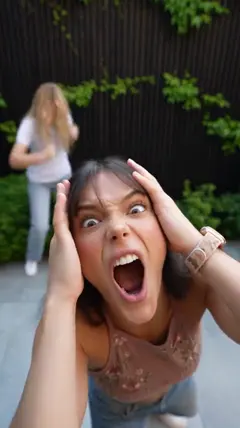
Person A lunges at a wide-angle lens, hands on head, mid-scream. Person B dances in the background.
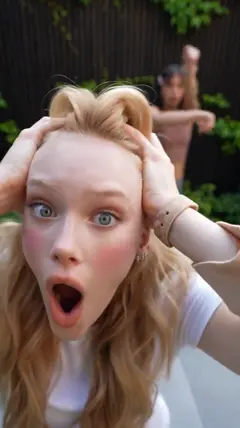
Camera cuts to Person B clutching their head, answering the beat while Person A dances behind.
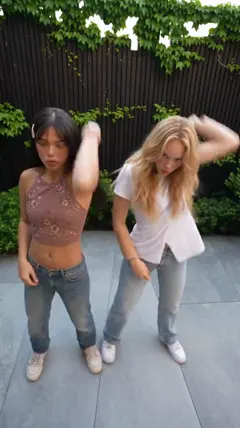
The cut goes wide: both performers dance side by side with arms up on the synth riff.
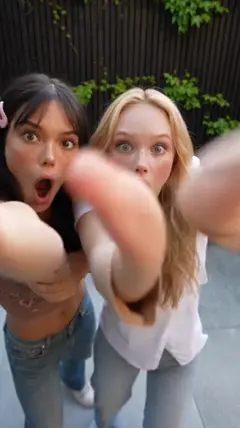
Both rush the camera together for one final synchronized scream.
Move from 100% to about 106% scale. A slow push keeps a static shot from feeling frozen.
Keep the courtyard dance at 1x, drop to 0.5x on the beat, then return to 1x.
Use one grade for every clip. A small warm shift keeps the dusk look consistent.
A light handheld feel reads as natural. Heavy shake looks like a mistake.
The trend usually runs without captions or stickers.
Line each cut up with the waveform peaks instead of fixed frame counts.
Hard cuts and a single whip pan are enough. Stacked effects look off-trend.
Wrong export settings are the most common reason an edit looks soft.
| Aspect ratio | 9:16 |
| Resolution | 1080 × 1920 |
| Frame rate | 30 fps |
| Watermark | Off |
| Length | 20 – 22 seconds |
| Bitrate | High |
Both routes produce a four-shot duo video. The difference is how much editing time you want to spend.
Put the audio on the timeline first, then drag each cut to the waveform peaks.
Use footage of the same pair in the same outfits. Hide joins with a whip pan or match cut.
Open the export settings and turn off the CapCut end card.
Start from the original footage and export at a high bitrate.
Rebuild the four shots by hand with the breakdown above.
More ways to make the duo video and understand the trend.
Common questions about the CapCut route.
Upload two photos and the built-in four-shot template handles the rest.